
Digital Rajasthan Initiative

Rajasthan SSO ID
Portal

One identity. Every government service.

Your complete guide to the Rajasthan Single Sign-On portal — registration, login, OTR for recruitment, Jan Aadhaar updates, and account recovery. Researched from official sources, updated for 2026.

100+
Govt. Services
Free
No Fee to Register
5 min
To Register
Portal Overview

What is the Rajasthan SSO Portal?

The Rajasthan Single Sign-On (SSO) portal is a digital initiative launched by the Department of Information Technology & Communication (IT&C), Government of Rajasthan under the Digital Rajasthan campaign.

Once you create an SSO ID, you gain access to 100+ government services — scholarships, recruitment, Jan Aadhaar, E-Mitra, pension records — all without separate usernames for each department.

Official Website: The government portal is at sso.rajasthan.gov.in. ssoidrajasthan.app is an independent guide to help you navigate it.
Portal at a Glance
Official Websitesso.rajasthan.gov.in
Launched ByDept. of IT & Communication, Govt. of Rajasthan
Primary GoalSingle window for 100+ e-Governance services
Top Servicese-Mitra, Recruitment, Scholarships, Jan Aadhaar, RajKaj
CostCompletely free for all users
Mobile AppRaj SSO — Google Play Store
LanguagesHindi & English
Helpdesk0141-5153222
Service Categories

Services Available on SSO Rajasthan

The SSO dashboard covers G2C (Government to Citizen) and G2G (Government to Government) apps, organised by user type.

🎓

Students & Job Seekers

  • Recruitment Portal — RPSC, RSSB, Police with OTR
  • Scholarship (SJE) — Social Justice scholarships
  • e-Learning / e-Library — Digital study materials
  • ABC ID Integration — Academic Bank of Credits
  • Haryalo Rajasthan — Environment portal
👥

General Citizens

  • e-Mitra — 500+ services: bills, certificates
  • Jan Aadhaar — Update family details
  • Rajasthan Sampark (181) — Grievance tracking
  • Chiranjeevi / MAAY — Health insurance
  • Raj eVault — Digital document locker
🏛️

Government Employees

  • RajKaj — Leave, ACR, correspondence
  • SIPF — PF balance, insurance, loans
  • PayManager — Salary slips, GA-55
  • Attendance MIS — Office attendance
  • e-Gras — Government receipts
🏭

Business Owners

  • GST Home Portal — State GST filing
  • BPAS — Building plan approvals
  • Udyog Aadhaar / BRN — Business registration
  • Industrial Licences — Permits and renewals
  • Labour Department — Factory compliance
Platform Features

Key Features of the SSO Portal

01

Unified Single Sign-On

One ID, one password for 200+ government applications across Education, Health, Revenue and more.

02

One-Time Registration (OTR)

Auto-fetches your name, DOB, and gender from Aadhaar for 2026 recruitment — register once, apply to multiple jobs.

03

Real-Time Tracking

Every application — scholarship, RTI, certificate — shows live status (Pending / Approved / Rejected) with timestamps.

04

Integrated e-Mitra

Pay electricity, water, BSNL bills. Apply for 500+ certificates. Recharge mobile and DTH — all from your dashboard.

05

Secure Digital Vault

Submitted documents and certificates are stored securely in your SSO profile — download verified copies any time.

06

Multi-Platform Access

Web portal plus Raj SSO Android app with biometric (fingerprint/face ID) login support for on-the-go access.

Step-by-Step

How to Register for SSO ID

Registration is completely free and takes under 5 minutes. Choose your category — Citizen, Udyog, or Government Employee.

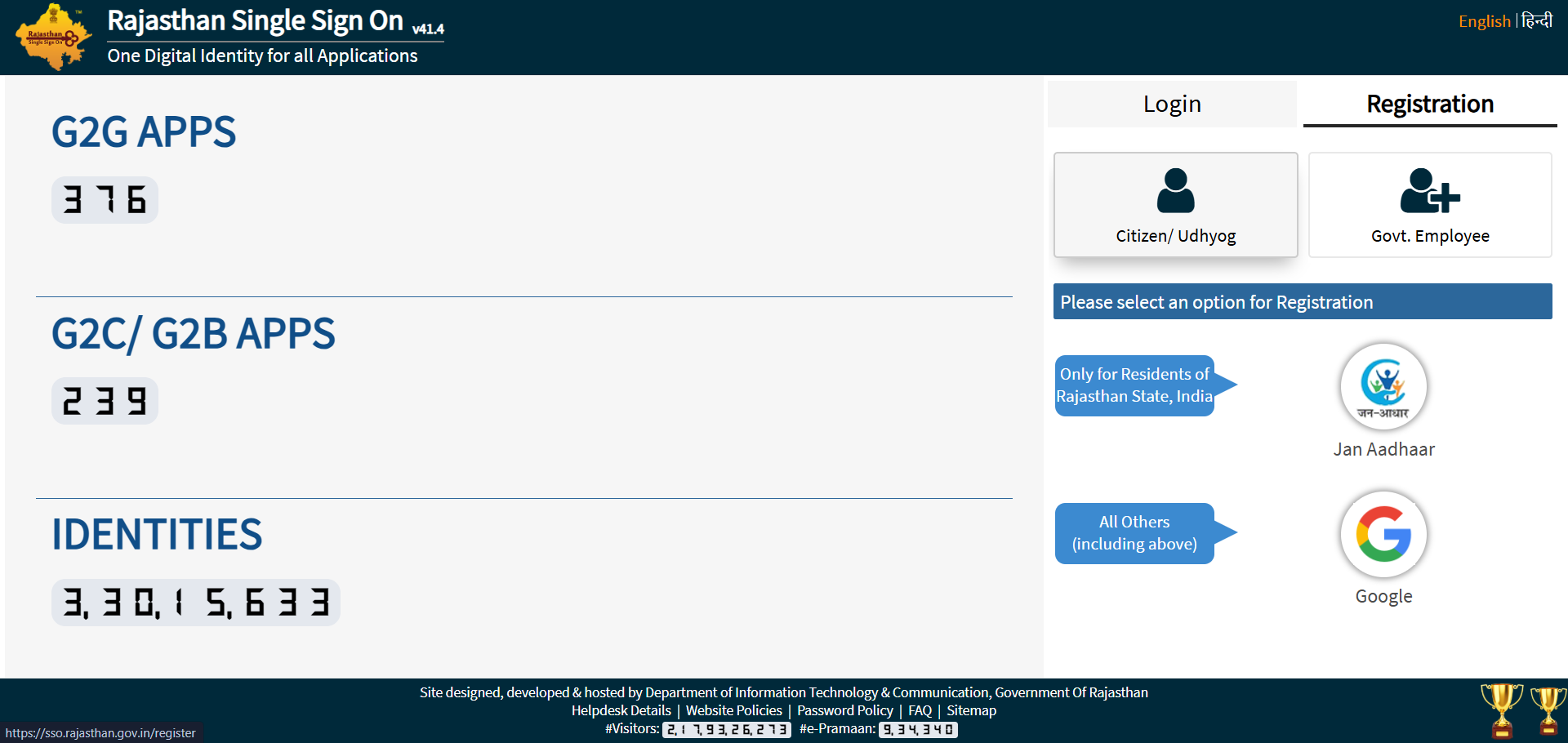
SSO Registration Rajasthan
📌 Jan Aadhaar is recommended for Rajasthan residents — gives immediate access to scholarships and recruitment portals.
1

Visit the Official SSO Registration Page

Go to sso.rajasthan.gov.in/register and click the Registration tab.

⚠️ Confirm the URL starts with https:// before entering any details.
2

Select Your Category

Citizen (residents, students, farmers) · Udyog (business owners) · Govt. Employee (state staff).

3

Choose Registration Method

Citizen: Jan Aadhaar, Aadhaar, Google, or Facebook.
Govt. Employee: SIPF Number + password (default: DOB in DDMMYYYY).
Udyog: BRN or Udyog Aadhaar.

4

Verify OTP and Create Your SSO ID

Verify the OTP on your mobile. Choose a unique username — it cannot be changed later. Set a strong password and add your email.

💡 Use your real name in your username (e.g., ramesh.sharma2026) — easier to retrieve.
5

Click Register — Done!

A success message appears and your SSO ID arrives via SMS and email. Save it immediately in a secure place.

✅ You can now log in at sso.rajasthan.gov.in.
📝 Full Registration Guide →

Common Registration Issues & Fixes

IssueSolution
OTP Not ReceivedEnsure your mobile is linked to Aadhaar/Jan Aadhaar. Check DND and try Resend OTP after 2 minutes.
"Mobile Number Already Exists"Your number is linked to an existing ID. Use "Forgot SSOID" to recover it — do not create a new account.
"ID Already Exists"You may have registered before. Use the Forgot SSOID recovery tool instead of registering again.
Jan Aadhaar Member Not ShowingYour name may not be updated in the Jan Aadhaar family list. Visit an E-Mitra centre to update it first.
Login Guide

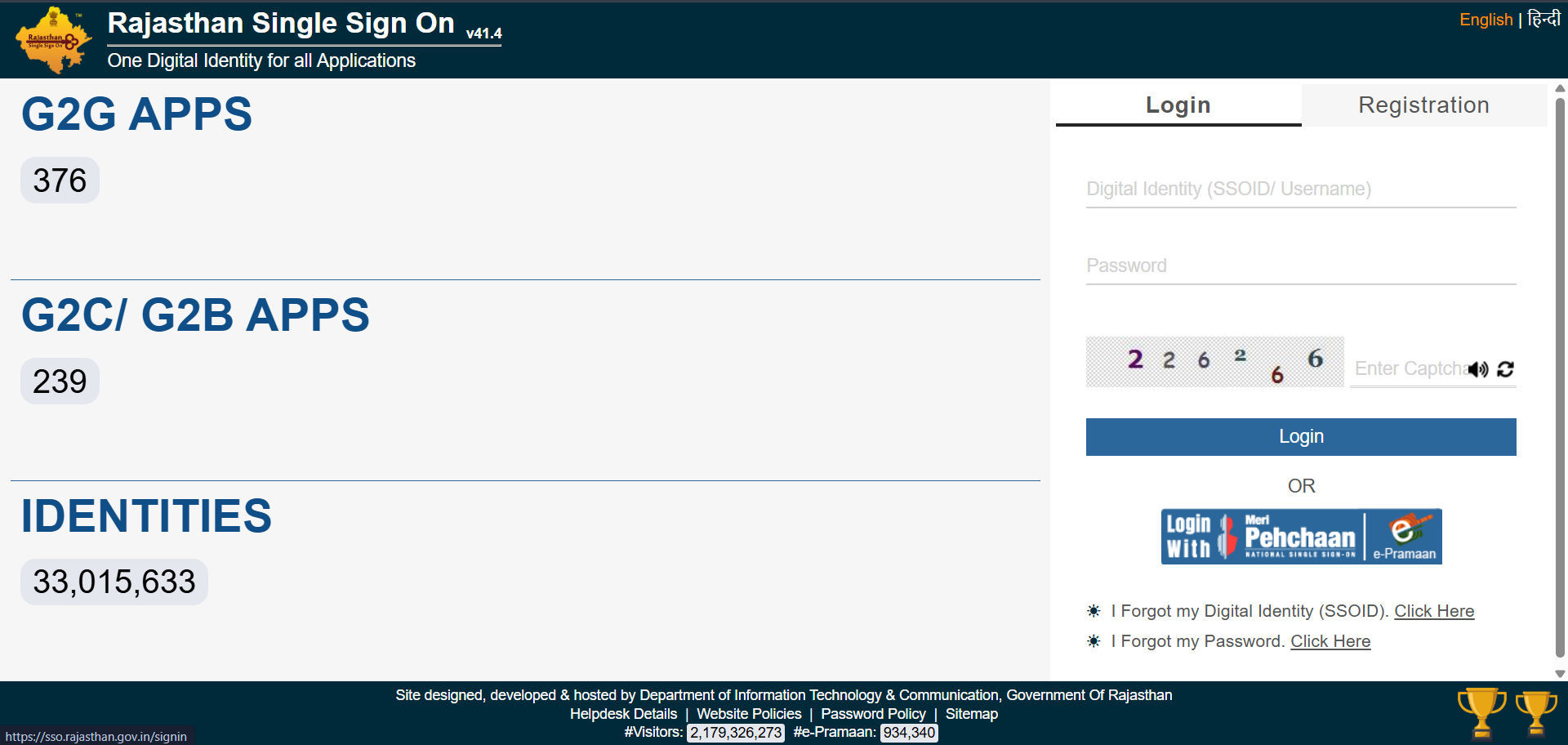
How to Login to the SSO Portal

1

Open the Official Portal

Visit sso.rajasthan.gov.in. Always verify the URL before typing credentials.

2

Enter SSO ID and Password

Type your SSO ID (Username) and Password. The password field is hidden for security.

3

Complete the Captcha

Enter the 6-digit number from the security image. Click the refresh icon if hard to read.

4

Click Login

Click Login to reach your SSO dashboard. All linked services are visible here.

💡 You can also log in via Jan Aadhaar, Google, or Facebook if you registered that way.
ErrorSolution
"Invalid Username/Password"Use "Forgot SSOID" or "Forgot Password" links on the login page.
"Connection not private"Check your device's Date & Time — incorrect time triggers SSL errors.
Captcha Not LoadingClear browser cache (Ctrl+Shift+Del) or use Incognito/Private mode.
Account LockedToo many failed attempts — wait 30 minutes or reset your password.
🔑 Full Login Guide →
SSO Rajasthan login
⚠️ Security: Never type your SSO password on a public computer. If you did, change it immediately from a personal device.
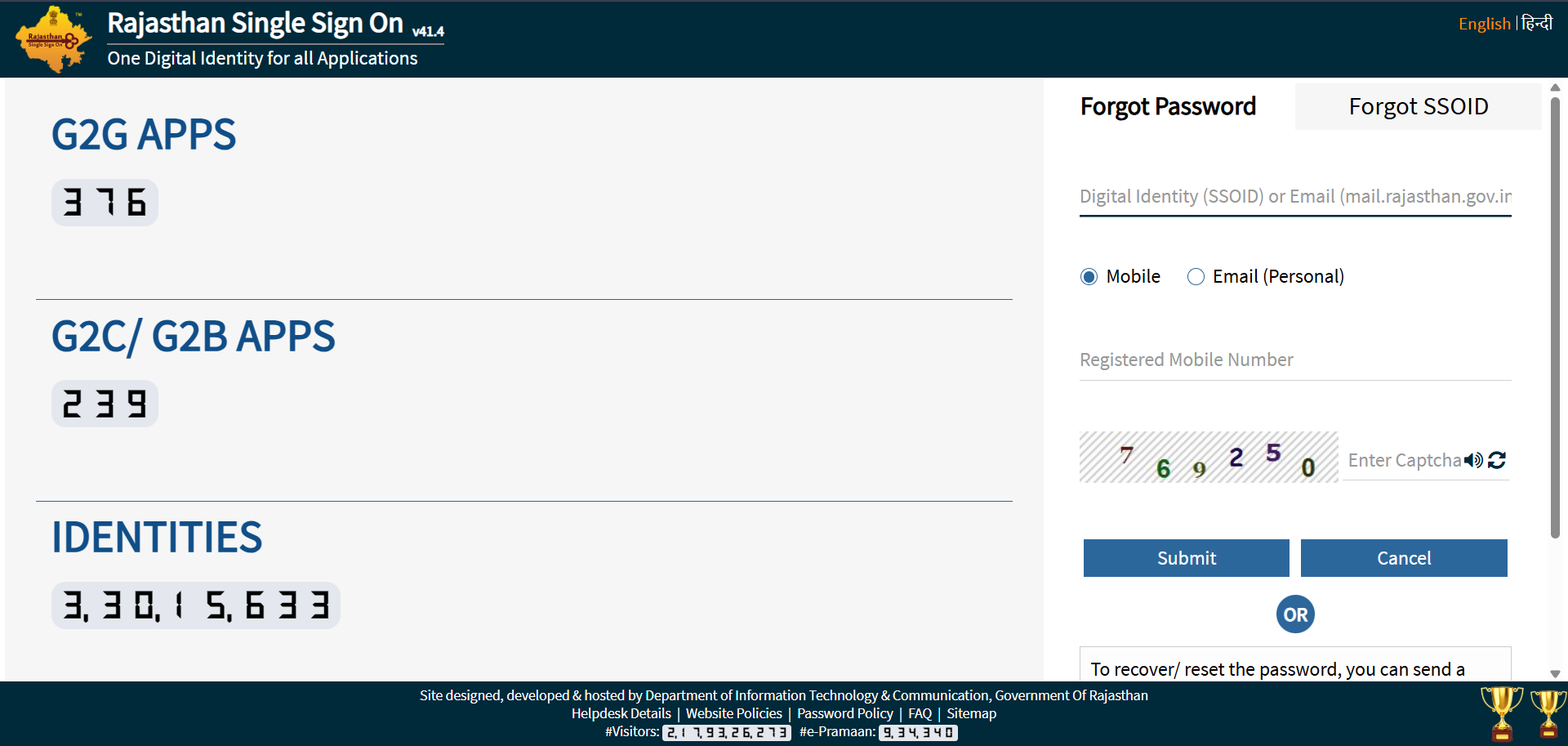
Forgot SSO ID
Account Recovery

Forgot SSO ID or Password?

1. Recover Your Forgotten SSO ID

🟢 Quickest — Via SMS (No Internet Required)

From your registered mobile, send: RJ SSO to 9223166166. Receive instant SMS reply with your SSO ID.

🔵 Via SSO Portal

Go to sso.rajasthan.gov.in → Click "I Forgot my Digital Identity (SSOID)" → Select ID type → Verify OTP → SSO ID shown on screen.

2. Reset Your Forgotten Password

🟢 Via SMS

Send: RJ SSO PASSWORD to 9223166166 from your registered number.

🔵 Via SSO Portal

Login page → Click "I Forgot my Password" → Enter SSO ID and email → Choose OTP delivery → Click reset link → Set new strong password.

⚠️ Registered number lost or deactivated? Visit the nearest E-Mitra centre with Aadhaar or Jan Aadhaar to update contact details in person.
🔓 Full Recovery Guide →
Recruitment 2026

One-Time Registration (OTR) 2026

Pay once, register once, and apply to multiple government vacancies throughout 2026.

1

Login and Open Recruitment Portal

Log in to your SSO account and click the Recruitment Portal icon.

2

Click "One Time Registration"

Locate and click the One Time Registration button on the Recruitment Portal dashboard.

3

Choose Verification Method

Aadhaar/Jan Aadhaar (Recommended): Auto-fetches Name, Father's Name, DOB, and Gender.
SSO Profile: Only if no Aadhaar — upload 10th marksheets additionally.

4

Verify Details and Add Educational Info

Cross-check all auto-fetched data. Link your ABC ID to sync degrees and marks digitally.

⚠️ All details must match your Class 10th Marksheet exactly. Corrections carry a ₹300 fee.
CategoryOTR Fee
General / OBC (Creamy) / Other State₹600
SC / ST / OBC (NCL) / EWS / PwD (Rajasthan)₹400
📌 Single-Time Fee: Once paid, no individual fees for 2026 exams — CET, LDC, Patwari, and others.
⚠️ Out-of-state candidates are treated as "General" — ₹600 fee regardless of home-state category.
🆕 2026: High-security recruitments now require Face Authentication during OTR. Keep your camera ready.
Duplicate Account Fix

Merging Multiple SSO IDs

Many users accidentally create two SSO IDs — one with Google and one with Jan Aadhaar. This blocks scholarship and job applications because your Aadhaar can only be linked to one SSO ID.

ℹ️ Important: The "Deactivate Account" button does not permanently delete your account. It opens a merge dialogue that safely transfers all your data.
🔀 Full Merge Guide →
1

Log In to the Account You Want to Close

Sign in using the citizen SSO ID you want to deactivate (not your primary Government Employee ID).

2

Open Edit Profile

Click the pencil (Edit Profile) icon at the top right of your dashboard.

3

Click "Deactivate Account" → Choose Merge

Select the Merge option from the popup.

⚠️ Confirm you are in the account you want to CLOSE, not the one you want to keep.
4

Verify OTP and Enter Primary SSO ID

Verify via OTP, then enter your active Government Employee SSO ID. Confirm — all data transfers and the duplicate is permanently closed.

Jan Aadhaar Guide

How to Update Jan Aadhaar via SSO (2026)

Mandatory for Chiranjeevi Health Insurance, Anuprati Coaching, and other Rajasthan schemes. Completely free via your SSO ID.

Phase 1 — Mandatory E-KYC (Do This First)

Complete E-KYC for all family members above 5 years before editing any details.

  1. Log in → click Jan Aadhaar icon
  2. Select "Jan Aadhaar E-KYC" portal
  3. Authenticate with Aadhaar OTP for each member

Phase 2 — Editing / Updating Information

After E-KYC, update: Income (income certificate), Bank Account (passbook/cheque), Mobile Number (OTP verify), Address (utility bill). Click SaveE-Sign with Head of Family's OTP.

Update TypeRequired Document (Scanned PDF)
Income UpdateSelf-declaration or Income Certificate (I, J, K forms)
Bank DetailsBank Passbook or Cancelled Cheque
New Member AdditionBirth Certificate & Aadhaar Card
Marriage UpdateMarriage Certificate
Land Details (Farmer)Jamabandi

How to Check Update Status

Requests take 7–15 days through two-level verification. Click "Enrolment Status" in your Jan Aadhaar dashboard.

Green Checkmark = Update approved.
Red Cross = Rejected — re-upload a clearer scanned document.
Official Contacts

SSO Rajasthan Official Support

ServiceContact
Helpline (General)0141-2925554 / 0141-5123717
Alternate Helpline0141-5153222
Email Supporthelpdesk.sso@rajasthan.gov.in
Jan Aadhaar Toll-Free1800-180-6127
Job Recruitment Help7340557555 / 9352323625
Support HoursMonday – Friday, 10:00 AM – 6:00 PM
All Guides

Quick Access — All SSO ID Guides

Common Questions

Frequently Asked Questions

Can a person from outside Rajasthan register for an SSO ID?
Yes. Anyone can create an SSO ID using a Google/Gmail account. While many services are for Rajasthan residents only, candidates from other states need an SSO ID for RPSC/RSSB jobs — they are treated as General category (₹600 OTR fee).
Is there any age limit to create an SSO ID?
There is no official age limit. For students, it is typically created when they reach the age for scholarship applications (Grade 6 onwards). Children under 18 may need parental assistance for OTP verification.
What should I do if the SSO website shows "Server Busy"?
The portal experiences high traffic near exam deadlines. Clear your browser cache (Ctrl+Shift+Del) or use Incognito mode. Try during off-peak hours — before 9 AM or after 8 PM. The Raj SSO mobile app is a good alternative during slowdowns.
How can I change my Name or Date of Birth in my SSO Profile?
You cannot edit these directly in SSO if your profile is linked to Jan Aadhaar or Aadhaar. First update your Aadhaar/Jan Aadhaar record at a government centre, then log in to SSO and click "Fetch / Update Profile" to sync the corrected data.
Can I use one SSO ID for both RPSC and scholarship applications?
Yes — this is the main benefit. One SSO ID gives access to the Recruitment Portal (RPSC/RSSB), Scholarship Portal (SJE), E-Mitra, and all other services. No separate accounts needed.
Is the Raj SSO mobile app safe to use?
Yes, only if downloaded from the official Google Play Store from the Rajasthan Government. Do not install SSO apps from third-party websites or APK files — these can steal credentials. The official app supports biometric login.
Conclusion

Your Gateway to Digital Rajasthan

The SSO ID Rajasthan portal is one of India's most comprehensive state-level e-governance initiatives. Whether you are a student, job seeker, citizen paying utility bills, government employee managing service records, or a business owner handling licences — your SSO ID simplifies every interaction with the Rajasthan government into a single, secure, paperless process.

If you have not created your SSO ID yet, the registration process takes under 5 minutes and is completely free. Visit sso.rajasthan.gov.in today. Keep your credentials safe, your registered mobile active, and your Jan Aadhaar updated — these three steps guarantee uninterrupted access to every service.

Reminder: ssoidrajasthan.app is an independent informational guide. All official actions must be completed on sso.rajasthan.gov.in.
JM
Junaid Malik
Content Creator & SSO Specialist

Junaid Malik is a digital content creator with over 4 years of experience covering Rajasthan's e-governance ecosystem. He breaks down SSO ID registration, Jan Aadhaar updates, OTR for recruitment, and E-Mitra into clear guides everyday citizens can follow. He monitors every update from the Department of IT&C, Rajasthan to keep all content accurate for 2026.

SSO Portal Jan Aadhaar E-Mitra Recruitment

Ready to Create Your SSO ID?

Register in under 5 minutes — completely free. Keep your Jan Aadhaar and mobile ready.